

Clinician Image Transfer Request
Request the secure transfer of MRI images and/or reports to an authorised healthcare professional or organisation.
IEP requires two actions
Complete this form for consent, governance and request tracking.
Your organisation must then submit an IEP to Anyone request.
Three simple steps
Complete the NHI form
Provide the patient, scan, recipient and consent information.
Choose your transfer route
Choose IEP, Egress or Unsure. IEP users must also send a separate IEP request.
NHI processes the transfer
We review the request and securely release the requested images and/or report.
Choose the route your organisation uses
IEP / IEP to Anyone
Choose IEP if your organisation has IEP access. After submitting the NHI form, you must also send a separate IEP to Anyone request.
Egress
Choose Egress if your organisation cannot use IEP. Include all authorised recipient email addresses in the form.
Submit your image transfer request
Please complete all required fields below.
Send your separate IEP request
Complete these steps after submitting the NHI request form.
Use these two NHI email addresses
They have different purposes within the IEP request.
Open IEP to Anyone
Sign in to your organisation's IEP account and start an IEP to Anyone request.
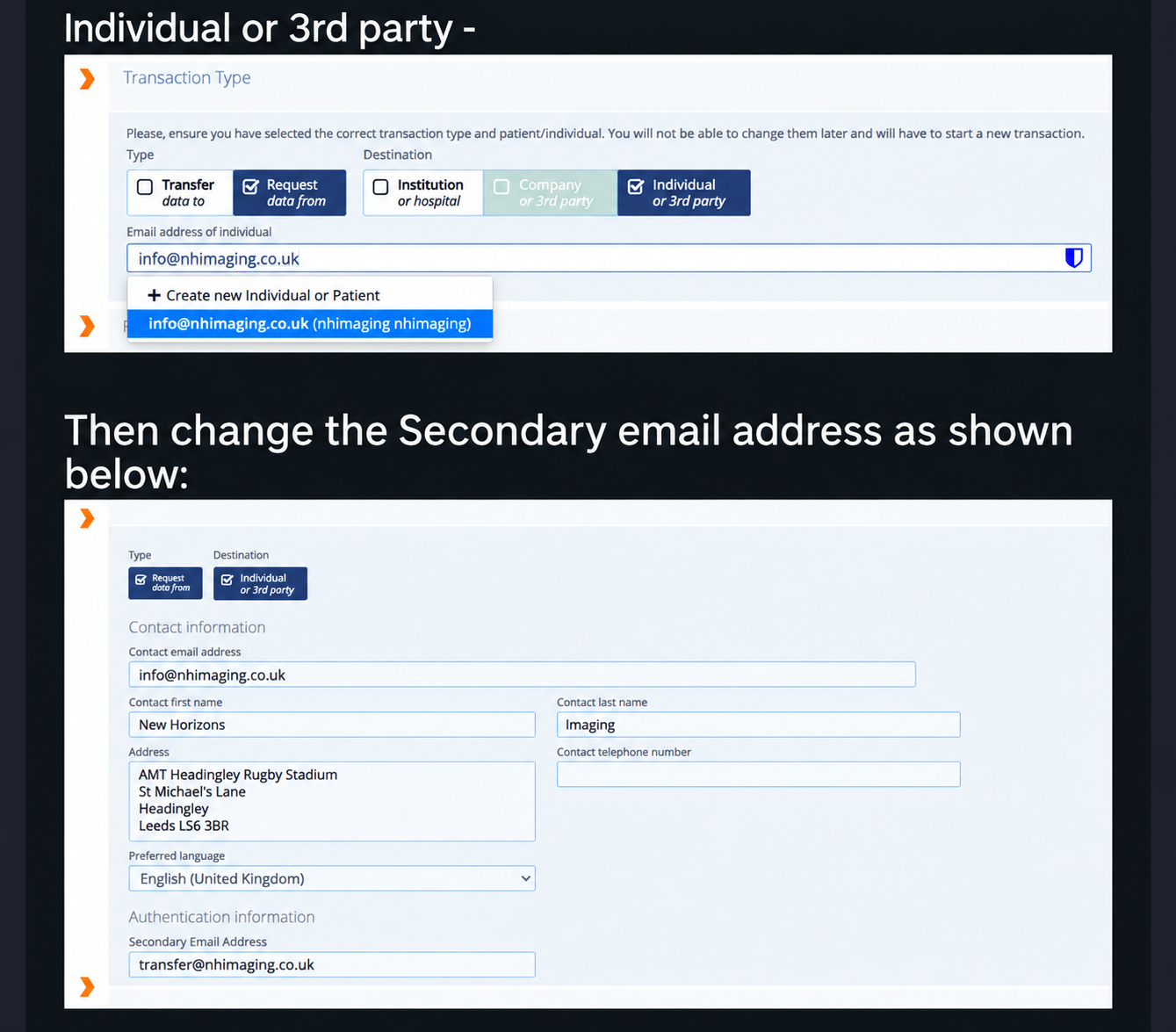
Choose the request type
Select Request data from, then Individual or 3rd party.
Enter the main NHI email
Use the following as the individual / contact email:
info@nhimaging.co.uk
New Horizons Imaging
AMT Headingley Rugby Stadium
St Michael's Lane
Headingley
Leeds LS6 3BR
Enter the Secondary / OTP email
Under Authentication Information, enter this as the Secondary Email Address:
transfer@nhimaging.co.ukThe IEP one-time password is sent to this address.
Submit the IEP request
Add the required patient and examination details, then submit the request through your organisation's normal IEP workflow.
Experts in
MRI scanning
Non-invasive, high-resolution imaging that provides detailed insight to support accurate diagnosis, treatment planning and peace of mind.